From a simple idea to a complete illustrated WordPress quiz
Creating a good quiz takes more than writing a few questions. You need clear wording, believable answer choices, accurate solutions, engaging images and a format that works smoothly on your website.
RapidQuizMaker Studio brings these steps together in one friendly Windows application.
Choose a topic, generate a structured question set with AI, review every question, create a matching illustration and export the finished quiz for the free RapidQuizMaker WordPress plugin. You stay in control throughout the process: nothing has to be published before you have checked and edited it.
- Get RapidQuizMaker Studio – Coming soon
- View the free WordPress plugin
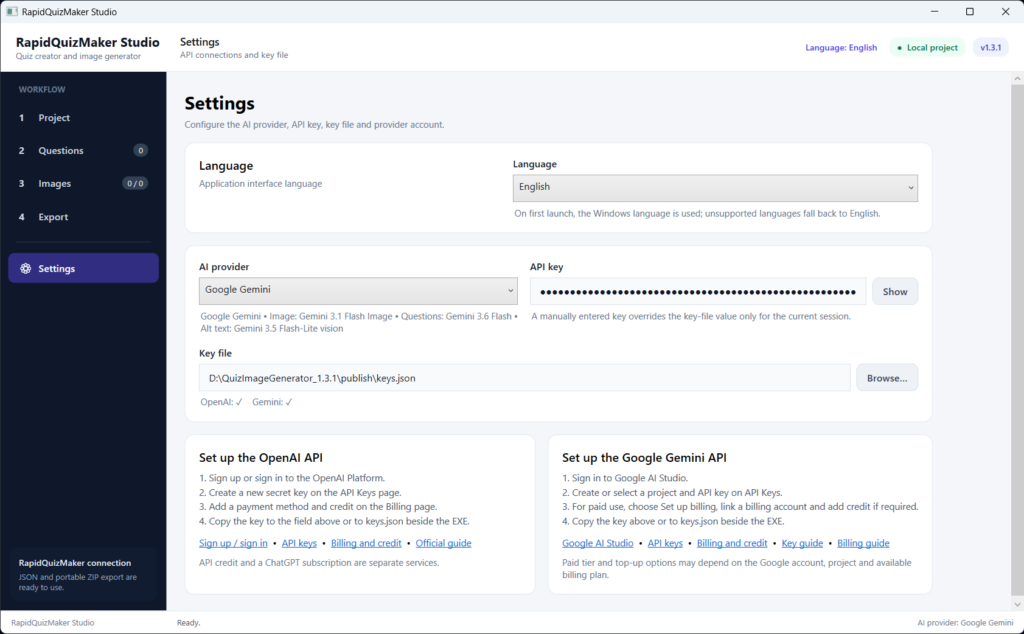
RapidQuizMaker Studio settings page:
Spend less time assembling quizzes — and more time improving them
RapidQuizMaker Studio is designed for teachers, trainers, educational websites and anyone who regularly creates quiz content.
Instead of moving between separate documents, image tools and WordPress screens, you can manage the complete preparation workflow in one place:
- generate questions from a topic;
- review and edit every question and answer;
- confirm the correct answer;
- add or improve explanations;
- generate an individual image for each question;
- create useful alt text for the images;
- save your work as a reusable local project;
- export the finished quiz for RapidQuizMaker.
AI helps with the time-consuming first draft, while you make the final decisions.
Create a complete question set from your topic
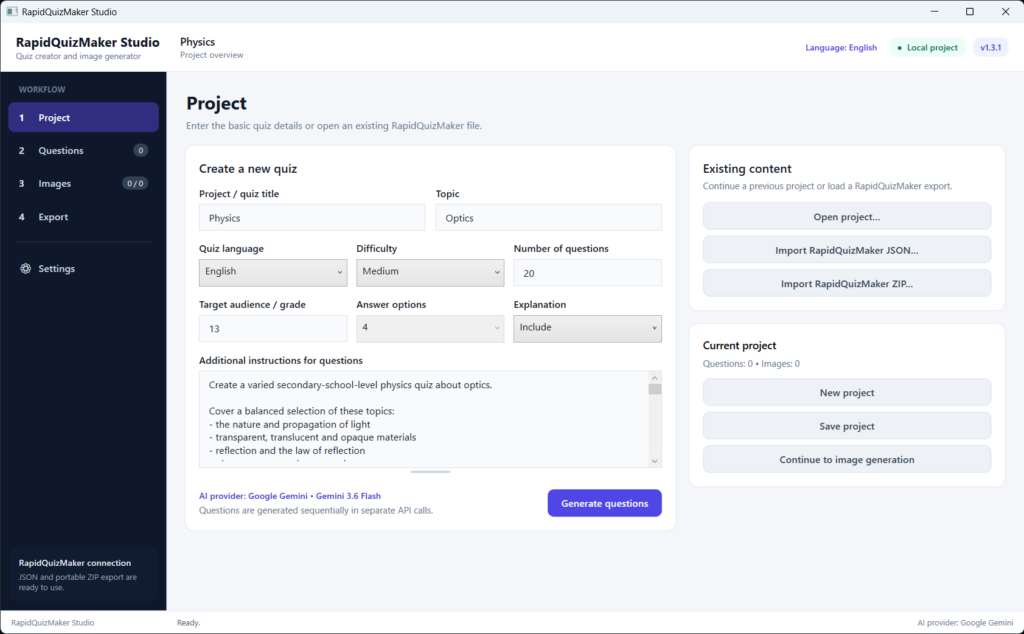
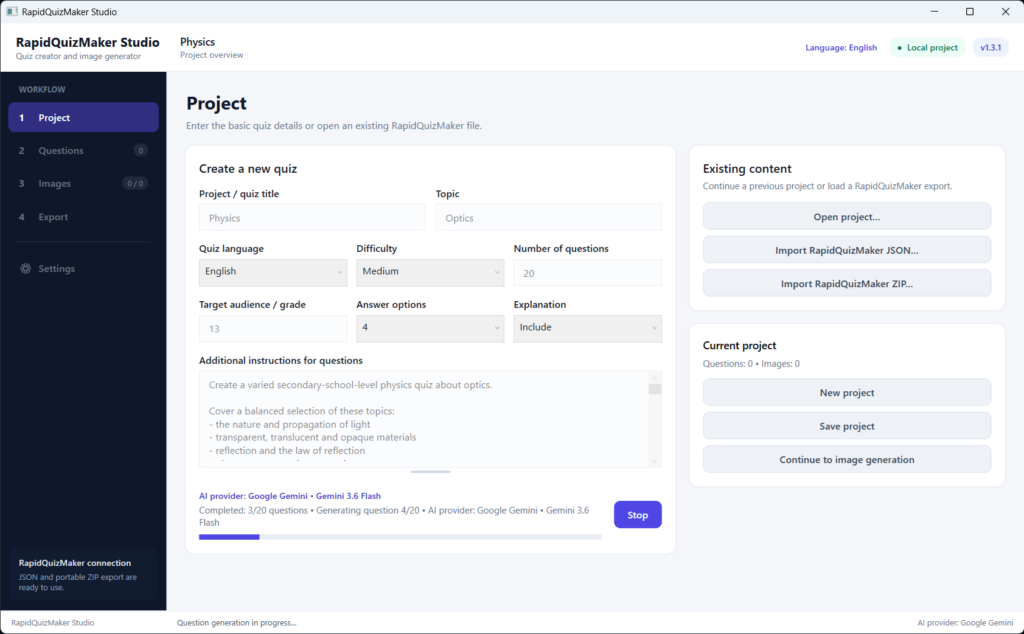
Enter the subject, select the quiz language and difficulty, describe the target audience and add your own instructions. RapidQuizMaker Studio can then generate the requested questions one by one.
This makes it suitable for a wide range of subjects, from history and science to IT, vocational training, language learning and general knowledge.
Want a secondary-school optics quiz? A beginner Linux test? A set of history questions with plausible wrong answers? Your additional instructions help guide the result toward the level and style you need.
The application supports multiple interface and quiz languages, including English, German, Spanish, French, Italian, Russian and Hungarian.
Review everything before you use it
AI-generated content should always be checked — especially when it will be used for education. That is why RapidQuizMaker Studio includes a dedicated question editor.
You can inspect and change:
- the question;
- all four answer options;
- the correct answer;
- the explanation;
- the image and its alt text;
- the review status.
If a question is not good enough, you can edit it or generate a replacement. If an image does not fit, you can replace it from a file or generate a new version for that single question.
This review-first workflow combines the speed of AI with the judgement of the person creating the quiz.
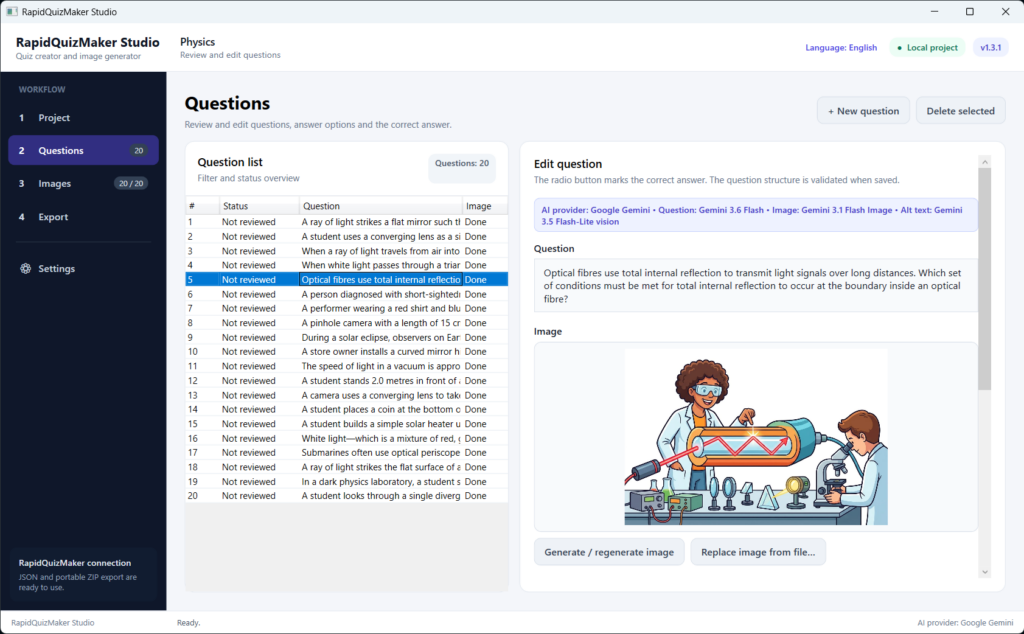
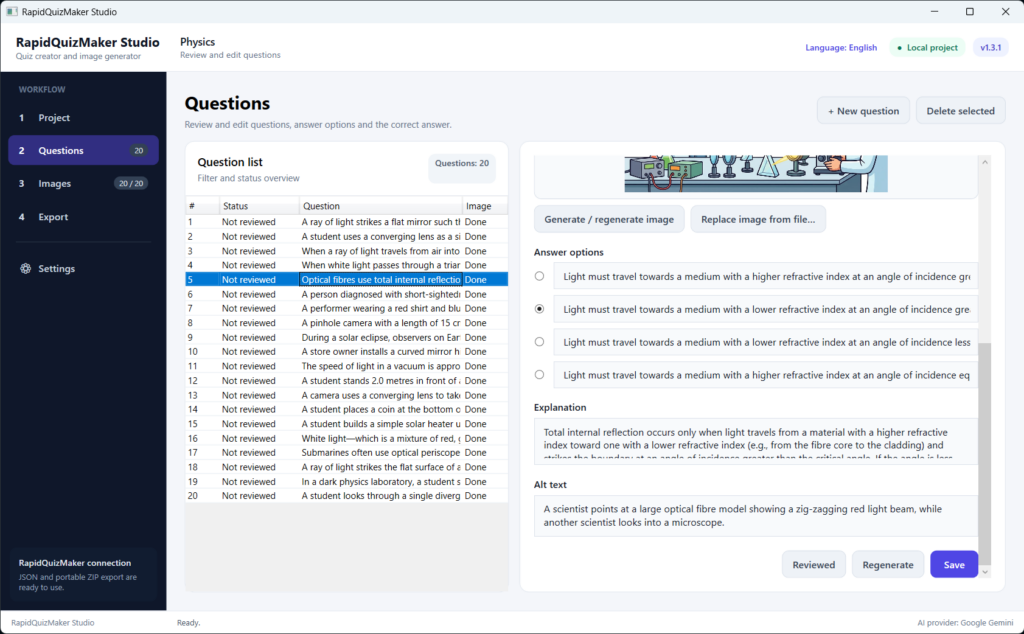
Review the question, answers, correct solution, explanation, image and alt text in one place.
Give every question its own illustration
Images can make a quiz more inviting, easier to scan and more memorable. RapidQuizMaker Studio can generate a separate illustration for every question using OpenAI or Google Gemini.
You can choose from several visual styles, including colorful educational clip art and photorealistic imagery, then adjust the instructions for your subject. Technical options such as aspect ratio, orientation, resolution, quality and output format are selected separately, so you do not have to rewrite them in every prompt.
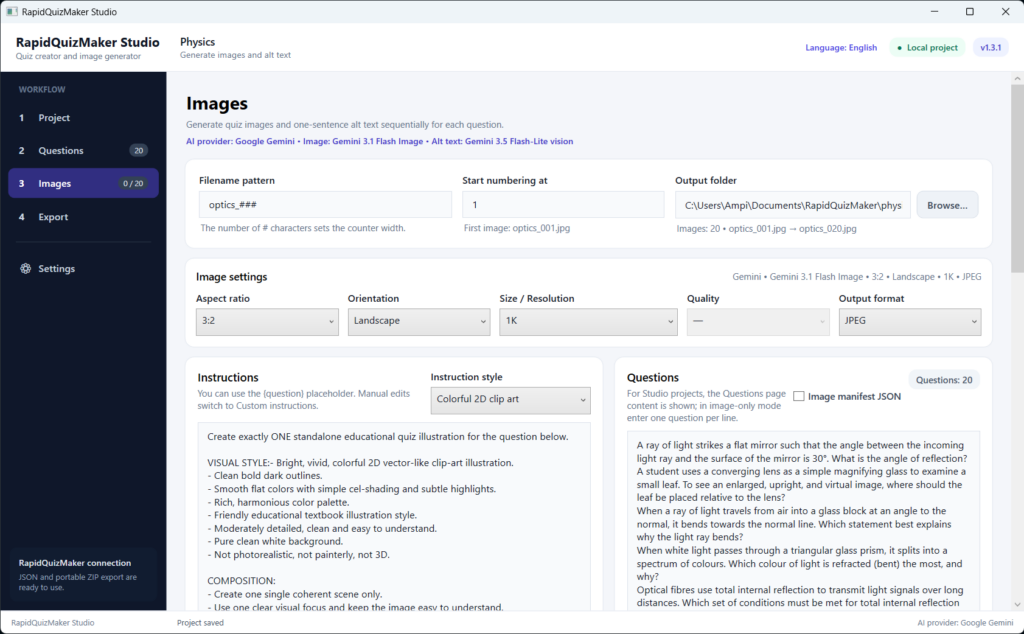
Most importantly, each question is processed as a separate image request. This helps produce one clear illustration per question instead of a collage or multi-panel image.
The prompts can also be designed so the image supports the topic without revealing the correct answer — especially useful for educational quizzes.
Available output formats include PNG, JPEG and WebP. A visible progress list shows which images are waiting, being generated, completed, stopped or failed.
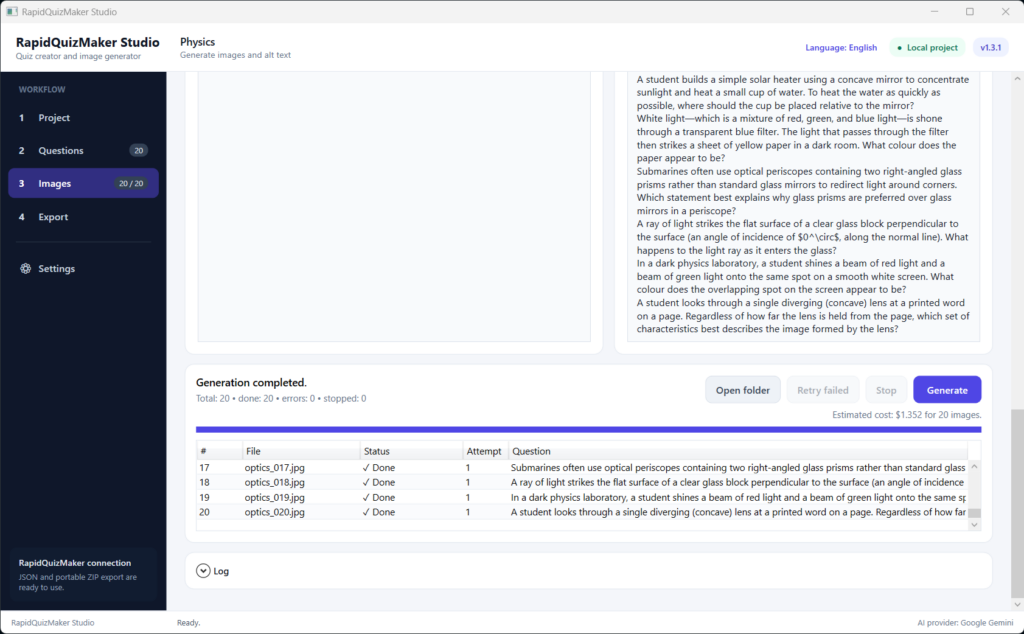
Alt text included in the workflow
RapidQuizMaker Studio can request a short description for each generated image and store it as alt text with the question.
This saves another repetitive step and makes it easier to prepare more accessible quiz content. You can still review and edit every description before export.
Save projects and continue later
You do not have to complete a quiz in one session. Save it as a local Studio project, reopen it later and continue editing questions, replacing images or preparing the final export.
The application warns you about unsaved changes before closing, helping protect your work during longer quiz projects.
Export directly for RapidQuizMaker
When the questions are ready, RapidQuizMaker Studio validates the quiz structure before export. This helps identify incomplete questions or missing answer choices before the package reaches WordPress.
Two export options are available:
- JSON export for workflows where images are uploaded to WordPress separately;
- portable ZIP export containing the quiz data and its images, ready to be imported on another WordPress website using RapidQuizMaker.
The free RapidQuizMaker plugin then handles the WordPress side: quiz presentation, standard and practice modes, grading, results and other website features.
Together, the two tools create a practical workflow from the first topic idea to a finished online quiz.
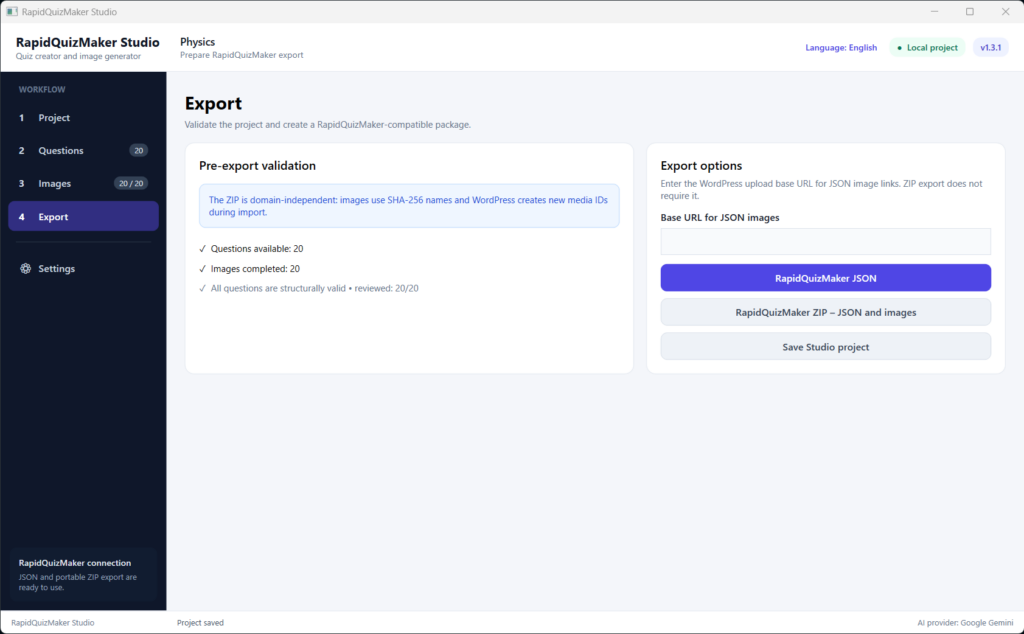
A natural companion to the free RapidQuizMaker plugin
RapidQuizMaker for WordPress and RapidQuizMaker Studio for Windows have different but complementary roles:
RapidQuizMaker WordPress plugin
- displays quizzes on your website;
- provides standard and practice experiences;
- evaluates answers and records results;
- manages the visitor-facing quiz experience.
RapidQuizMaker Studio
- helps create and organize the quiz content;
- supports AI-assisted question and image generation;
- provides a comfortable review and editing workflow;
- prepares JSON or ZIP packages for WordPress import.
The WordPress plugin is free. RapidQuizMaker Studio is the optional desktop companion for users who want a faster, more visual and more convenient content-creation workflow.
The completed quiz
Who is it for?
RapidQuizMaker Studio may be especially useful for:
- teachers preparing classroom tests and practice quizzes;
- vocational trainers creating topic-based assessments;
- tutors and course creators;
- schools and educational websites;
- bloggers who publish knowledge quizzes;
- businesses creating onboarding or internal training questions;
- anyone who wants to build illustrated WordPress quizzes without assembling every part manually.
You do not need to be a developer. If you can review a question and edit a form, you can work with RapidQuizMaker Studio.
You remain in control
RapidQuizMaker Studio uses your own supported AI provider API key. AI usage and image-generation charges are billed separately by the selected provider, and the application displays an estimated image-generation cost before you start.
API keys are stored or entered locally and should never be included in screenshots, shared project packages or public files.
Generated questions, answers, explanations, images and alt text should always be reviewed before publication. The Studio is designed to make that review easier, not to replace it.
AI API costs: clear and under your control
RapidQuizMaker Studio and AI usage are two separate costs. The application uses your own OpenAI or Google Gemini API key, and any AI usage is billed directly to your account by the selected provider. RapidPlugins does not add a markup to these charges.
The cost depends on the provider, model, image resolution, quality setting and the number of questions. Each quiz image is generated as a separate request, so you remain in control of how many images are created.
As a current example, checked on 12 August 2026:
- Ten OpenAI GPT Image 2 landscape images at 1536 × 1024 resolution and Medium quality have an estimated image-output cost of approximately $0.41.
- Ten Google Gemini 3.1 Flash Image images at 1K resolution have an estimated image-output cost of approximately $0.67.
Small additional token-based charges may apply when generating questions, processing prompts and creating image alt text.
RapidQuizMaker Studio displays an estimated image-generation cost before the process begins. This is an estimate only; the final amount is calculated by your chosen AI provider.
API prices may change. Please check the current official pricing pages:
You may need to enable billing or add credit to your provider account before using paid AI models.
Turn your next quiz idea into a finished project
Whether you are preparing two questions for a quick classroom activity or a complete illustrated quiz series, RapidQuizMaker Studio can remove much of the repetitive work while keeping the creative and educational decisions in your hands.
Create the questions. Review the answers. Generate the illustrations. Export the package. Publish with RapidQuizMaker.
Build better quizzes with a workflow designed around the way quiz creators actually work.
- Get RapidQuizMaker Studio – Coming soon
- Download RapidQuizMaker for WordPress — Free