Faster WordPress websites with file-based full-page caching
RapidUtils HTTP Cache is a standalone WordPress caching plugin that stores the completed HTML output of public pages in files. Previously cached pages can be served before WordPress is fully loaded, helping reduce PHP execution, database load, and page response times.
The plugin uses WordPress’s standard advanced-cache.php drop-in mechanism. It does not perform CSS or JavaScript minification, file concatenation, image optimization, or CDN management. Its purpose is to provide focused, secure, and transparent full-page caching.
Guest and Subscriber caching
RapidUtils HTTP Cache handles logged-out visitors and logged-in Subscriber users separately.
Guest cache
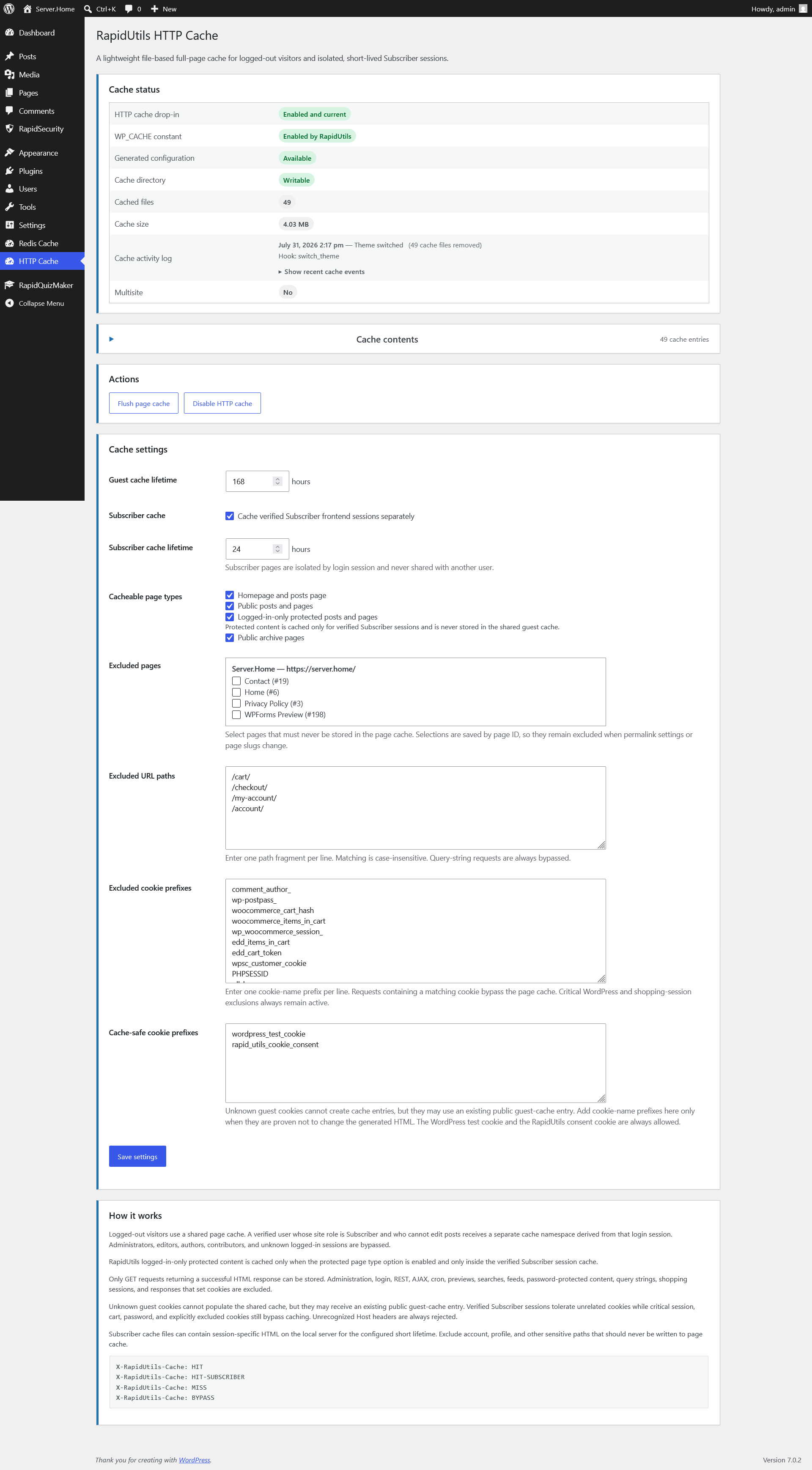
Logged-out visitors can share a common cache for the same public URLs. The guest cache lifetime can be configured in hours from the WordPress administration interface:
- default value: 24 hours;
- maximum value: 168 hours.
Requests containing personalized, session-dependent, or explicitly excluded cookies cannot write unsafe content into the shared guest cache.
Subscriber cache
The Subscriber cache is not a shared role-based cache. Every verified WordPress login session receives its own isolated cache namespace.
The Subscriber cache:
- is completely separated from the guest cache;
- cannot be shared between different users or sessions;
- never stores the raw WordPress login cookie;
- verifies the WordPress authentication cookie and session token;
- does not serve cached content to expired or revoked sessions.
The default Subscriber cache lifetime is 1 hour, with a maximum value of 24 hours.
Administrators, Editors, Authors, and Contributors are not full-page cached by default.
Configurable cacheable page types
Administrators can enable or disable caching separately for the following page types:
- front page;
- public posts and pages;
- archive pages;
- login-restricted protected posts and pages.
Search results, 404 pages, previews, administration pages, REST API requests, AJAX requests, and other unsupported response types are excluded from the cache by default.
RapidUtils Access Restriction integration
The plugin integrates with the Access Restriction module of the main RapidUtils plugin.
Content is treated as protected only when:
- the RapidUtils plugin is active;
- the Access Restriction module is enabled;
- the relevant post type is supported;
- the specific post or page is marked as protected.
Protected content can never be stored in the guest cache. When the corresponding setting is enabled, protected content may only be stored inside the isolated cache of a verified Subscriber session.
Exclusions
Excluded URLs
Administrators can define path or URL patterns that must never be cached.
The plugin also checks encoded path variations, reducing the possibility of bypassing an exclusion through URL encoding.
Excluded pages
WordPress pages can be selected from a dedicated checkbox list. Exclusions are stored by page ID rather than by slug or permalink.
This means an exclusion remains valid when:
- the page slug changes;
- the page is moved under a different parent;
- the permalink structure changes;
- the website moves from HTTP to HTTPS;
- the page’s public URL changes.
In a WordPress Multisite environment, the site ID and page ID are stored together to prevent conflicts between pages with identical IDs on different sites.
Cookie exclusions
Cookies associated with sessions, e-commerce carts, password-protected content, or other personalized functionality can trigger a cache bypass.
Cache-safe cookie prefixes can be configured separately, allowing administrators to balance caching performance with the protection of personalized content.
Automatic cache invalidation
RapidUtils HTTP Cache automatically clears or invalidates cached content when relevant WordPress events occur.
These events may include:
- creating, updating, or deleting a post or page;
- comment changes;
- taxonomy or navigation menu changes;
- switching the active theme;
- changes to relevant WordPress settings;
- permalink structure changes;
- Access Restriction setting changes;
- Subscriber session or permission changes.
After a plugin update, the plugin’s own advanced-cache.php drop-in is updated automatically. Drop-ins owned by other plugins are never overwritten or deleted.
Cache content overview
The WordPress administration interface includes a dedicated, collapsed-by-default Cache contents panel that displays stored cache entries.
Table columns can be enabled or disabled as needed. Column preferences are saved separately for each administrator.
Available information may include:
- cache type;
- website in a Multisite environment;
- URL;
- creation time;
- expiration time;
- remaining lifetime;
- file size;
- status;
- shortened cache filename;
- individual delete action.
The table never displays raw authentication cookies, session tokens, or complete Subscriber session hashes.
Cache activity log
The Cache status panel displays the time and reason for the most recent cache operation.
The activity log helps administrators determine whether cached content was invalidated by:
- a manual cache clear;
- saving plugin settings;
- editing a post or page;
- a plugin update;
- a WordPress event;
- a Subscriber session change;
- scheduled cache cleanup.
Detailed history is displayed in a collapsed section. The plugin stores only a limited number of structured events and does not save cookies, session tokens, page content, or full filesystem paths.
Diagnostic HTTP headers
Cache behavior can be inspected with browser developer tools or other HTTP diagnostic utilities.
The plugin may return headers such as:
X-RapidUtils-Cache: HITX-RapidUtils-Cache: MISSX-RapidUtils-Cache: BYPASSX-RapidUtils-Cache: HIT-SUBSCRIBERX-RapidUtils-Cache: MISS-SUBSCRIBER
Detailed bypass statuses can help identify why a particular request was not cached.
Content Security Policy compatibility
The plugin supports caching pages that use Content Security Policy nonces.
The original nonce is not stored and reused indefinitely inside the cache file. A new cryptographically secure nonce can be generated for each cache hit and inserted consistently into both the CSP header and the related HTML nonce attributes.
WordPress Multisite support
RapidUtils HTTP Cache is compatible with WordPress Multisite installations.
Cache namespaces are separated according to:
- network;
- site ID;
- domain;
- protocol;
- URL;
- guest or Subscriber session.
Cached content cannot be mixed between different sites, domains, or user sessions.
Security-focused operation
The plugin is developed with WordPress security recommendations in mind.
Important safeguards include:
- nonce and capability checks for administrative actions;
- input validation and sanitization;
- consistent escaping of administrative output;
- HMAC-based cache filenames;
- exact WordPress session verification;
- complete separation of guest and Subscriber caches;
- protection against overwriting third-party
advanced-cache.phpdrop-ins; - rejection of manipulated Host headers;
- cache file count and storage size limits;
- safer and verified
wp-config.phpmodification; - exclusion of sensitive data from the administration interface and diagnostic logs.
System requirements
- WordPress 7.0 or newer;
- PHP 8.0 or newer;
- writable WordPress content and cache directories;
- an enabled
WP_CACHEconfiguration; - an environment that supports the
advanced-cache.phpdrop-in mechanism.
What does the plugin not do?
RapidUtils HTTP Cache does not provide:
- CSS or JavaScript minification;
- CSS or JavaScript file concatenation;
- image optimization;
- WebP or AVIF conversion;
- CDN management;
- cache preloading;
- Redis object caching;
- database optimization.
Separate solutions designed specifically for those tasks can be used alongside the plugin when required.
Summary
RapidUtils HTTP Cache is a transparent, security-focused, file-based full-page caching solution for WordPress. It handles guests and verified Subscriber sessions separately, supports protected content, provides detailed administration and diagnostic tools, and remains focused on reliable page caching without combining unrelated optimization features into a single plugin.
A szöveg hangvétele professzionális termékoldalhoz illeszkedik, és közvetlenül beilleszthető a rapidplugins.dev oldalra.