RapidUtils Redis Cache is a high-performance persistent object caching plugin for WordPress. It uses the PhpRedis extension and a dedicated object-cache.php drop-in to store frequently accessed WordPress data in Redis, helping reduce repeated database queries and improve overall website responsiveness.
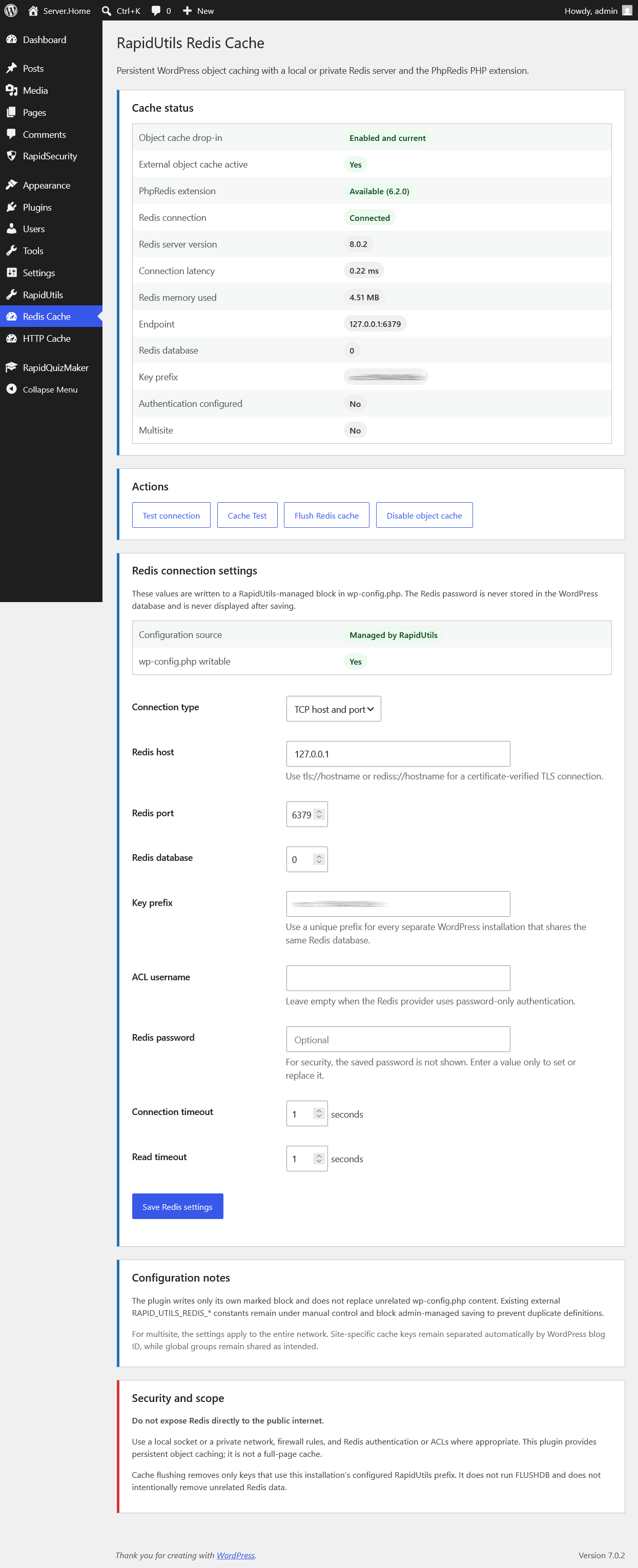
The plugin is designed for secure, reliable operation on both single-site and WordPress Multisite installations. It includes an easy-to-use administration interface for configuring the Redis connection, managing the object-cache drop-in, clearing the site’s own Redis cache, and verifying that persistent caching works correctly across separate requests.
Key Features
Persistent Redis Object Cache
RapidUtils Redis Cache implements the standard WordPress Object Cache API through its own object-cache.php drop-in. Frequently used data can remain available between page requests instead of being rebuilt from the database every time.
When Redis or the PhpRedis extension is unavailable, the drop-in safely falls back to WordPress request-level memory caching.
Flexible Redis Connection Settings
Configure the Redis connection directly from the WordPress administration area:
- TCP or Unix socket connection
- Redis host and port
- Unix socket path
- Redis database number
- Redis ACL username
- Redis password
- Connection timeout
- Read timeout
- Optional encrypted Redis connections
- Custom cache key prefix
Sensitive connection settings are stored in a dedicated block inside wp-config.php.
Secure Password Handling
The Redis password is never stored in the WordPress database and is not displayed again in the administration interface after saving.
Leaving the password field empty preserves the existing password, while a separate option allows it to be removed explicitly.
Safe Cache Isolation
Each WordPress installation receives its own Redis key namespace. When no manual prefix is configured, the plugin automatically generates an installation-specific prefix using information unique to the website.
This allows multiple WordPress installations to use the same Redis server or database without sharing cached data.
RapidUtils Redis Cache never uses:
FLUSHALLFLUSHDB- unrestricted
KEYS *queries
Cache clearing only affects keys belonging to the current RapidUtils Redis Cache namespace.
Authenticated Cache Payloads
Cached Redis payloads are protected with key-bound HMAC authentication. Modified, corrupted, or copied payloads are rejected before they can be decoded or deserialized.
This helps protect WordPress from Redis cache poisoning and unsafe object deserialization if cached data is altered outside the plugin.
WordPress Multisite Support
The plugin supports WordPress Multisite environments.
- Individual sites receive separate blog-specific cache namespaces.
- WordPress global cache groups remain shared across the network where required.
- Network administrators can manage the object cache using the appropriate multisite capabilities.
- Runtime diagnostics account for multisite-specific external object cache states.
Automatic Drop-in Management
RapidUtils Redis Cache can safely install and manage its own wp-content/object-cache.php drop-in.
The plugin:
- detects whether the installed drop-in belongs to RapidUtils Redis Cache;
- does not overwrite drop-ins created by other plugins;
- does not delete unknown or modified drop-ins;
- automatically synchronizes its own drop-in after plugin updates;
- verifies the installed drop-in using a SHA-256 integrity check;
- preserves the previous working file if an update cannot be completed safely.
Built-in Cache Test
The integrated Cache Test verifies more than basic Redis connectivity. It confirms that WordPress is actually using Redis as a persistent object cache.
The test checks:
- the installed drop-in status;
- the WordPress external object cache state;
- the active runtime Redis connection;
- writing through the WordPress Object Cache API;
- creation of the corresponding Redis key;
- reading the value during a separate request;
- value integrity;
- deletion through the WordPress API;
- removal of the actual Redis key;
- cache behavior after deletion.
Successful tests display a clear green confirmation message. Failed tests provide detailed diagnostic information without exposing Redis passwords or other sensitive credentials.
Safe Configuration File Updates
Changes to wp-config.php are limited to the plugin’s own marked configuration block:
/* BEGIN RapidUtils Redis Cache */
/* END RapidUtils Redis Cache */
The plugin does not overwrite manually defined external RAPID_UTILS_REDIS_* constants.
Configuration and drop-in updates use validated temporary files, content verification, permission preservation, and recovery handling to reduce the risk of incomplete or damaged file writes.
Administration Tools
The Redis Cache administration page provides:
- current cache and drop-in status;
- Redis connection diagnostics;
- Redis settings management;
- connection testing;
- object cache enable, update, repair, and disable actions;
- namespace-safe cache clearing;
- persistent Cache Test results;
- multisite-aware status information;
- warnings for insecure remote Redis connections.
Performance Benefits
Persistent object caching can improve WordPress performance by reducing repeated database queries for frequently accessed information such as:
- WordPress options;
- user and user metadata;
- taxonomy data;
- query results;
- multisite network data;
- plugin-generated cached objects.
The actual performance improvement depends on the website, theme, installed plugins, traffic patterns, hosting environment, and Redis server configuration.
Security Recommendations
For the best security:
- use a local Unix socket or loopback Redis connection whenever possible;
- do not expose the Redis port directly to the public internet;
- use Redis ACL authentication;
- assign a separate Redis user and key namespace to each website;
- use TLS or a protected private network for remote Redis connections;
- grant only the Redis commands required for object caching;
- avoid sharing the same Redis credentials between unrelated applications.
Requirements
- WordPress 7.0 or later
- PHP 8.0 or later
- A running Redis server
- The PhpRedis PHP extension
- Write access to
wp-config.phpwhen saving Redis settings - Write access to
wp-contentwhen installing or updating the object-cache drop-in
Important Notes
RapidUtils Redis Cache provides persistent object caching, not full-page caching. It complements page-cache solutions by accelerating WordPress data access at the application level.
After enabling the object cache, run the built-in Cache Test to confirm that Redis values remain available between separate WordPress requests.
When upgrading from an older cache data format, previously stored Redis entries may be ignored for security reasons. WordPress will automatically rebuild the required cache entries during normal operation.